10 reasons why OCR is so important for scanning?
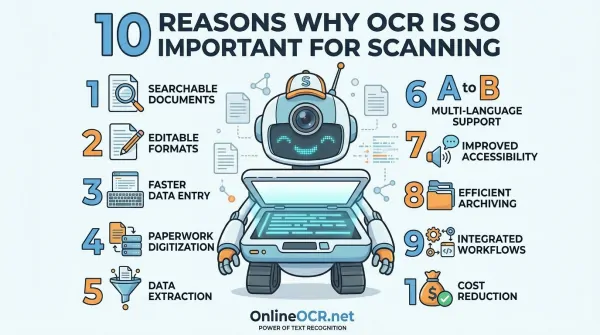
Tired of wrestling with mountains of paper or watching digital projects stumble? Whether you're a student drowning in research, a developer building the next big thing, a researcher sifting through archives, or a home user trying to digitize memories, you've probably hit a wall with manual data. But guess what? A revolutionary hero has arrived: OCR!
Get ready to meet your new digital superpower: Optical Character Recognition, or OCR online. It's not just a tool; it's the key to unlocking a whole new world of digital possibilities, transforming how you interact with information.
So, What Exactly is This OCR Magic?
At its core, OCR, or Optical Character Recognition, is like giving your computer the ability to read. Imagine scanning a textbook page, a handwritten note, or even a photo of a sign – OCR software dives in, picks out individual letters, stitches them into words, and then into sentences. Suddenly, that static image isn't just a picture anymore; it's live, searchable, and editable text! Think of it as turning your 'image-only' PDF to Excel or this PDF to Word (or just into smart, interactive documents).
This isn't just basic text extraction; we're talking advanced AI and Intelligent Character Recognition (ICR) that can even decipher different languages and the nuances of handwritten notes! That's why researchers are using it to digitize vast historical archives, and legal professionals are transforming stacks of paper into searchable, editable, and shareable digital files – as easy to work with as your favorite word processor. For developers, think of the possibilities this intelligent recognition opens up!
Stop Retyping, Start Editing!
Looking for FREE Online OCR Converter? Use OnlineOCR.net!
If you're looking for a quick, "no-install" solution to round out your toolkit, OnlineOCR.net is a fantastic web-based alternative to built-in Windows tools.
It’s particularly useful when you're working on a guest computer or simply don't want to clutter your system with extra software.
Why choose OnlineOCR.net as free online OCR tool?
The service supports over 46 languages and allows you to convert images or PDFs directly into editable Word, Excel, or Plain Text formats. While the free tier limits you to 5 images per hour, its accuracy with standard fonts is impressive, making it a reliable "Plan B" for those one-off extraction tasks that require a bit more finesse than a simple screenshot.
3 Simple Steps to Freedom:
- Upload your image or PDF.
- Select your language and output format (Docx, Xlsx, or TXT).
- Convert and download your editable file!
Try it for FREE now at OnlineOCR.net
Unlocking Potential: The Game-Changing Benefits of OCR
Beyond just reading text, OCR supercharges your efficiency and productivity. Imagine instantly finding that one crucial detail in a mountain of documents – whether it's for your thesis, a coding project, historical research, or just finding that old utility bill. For anyone dealing with vast amounts of information, this instant searchability is pure gold.
1. Boost Your Productivity (Seriously!)
Think of all the hours you spend digging for information. With OCR, that time vanishes! Students can find research faster, developers can access specs instantly, researchers can cross-reference documents in seconds, and home users can locate important receipts without a treasure hunt. No more physical trips to dusty archives or filing cabinets – your data is accessible, wherever you are.
2. Slash Those Costs (And Save Your Wallet!)
For businesses and even individuals, OCR is a budget hero. It automates tasks that used to require dedicated staff, cutting down on manual data entry expenses. Plus, think of the savings on printing, copying, and shipping physical documents – it all adds up!
3. Pinpoint Accuracy (No More Typos!)
Let's be honest: humans make mistakes, especially with repetitive data entry. Manual processes are a breeding ground for errors and lost information. OCR's automated workflow drastically reduces these chances. It's like having a meticulous digital assistant that never gets tired, ensuring your data is captured correctly the first time, every time.
4. Fortify Your Data Security (Sleep Easy!)
Your data is precious, whether it's sensitive research, personal records, or critical business information. Physical documents are fragile – vulnerable to spills, fires, theft, or just plain getting lost. With OCR, you transform these vulnerable papers into secure digital files. Once digitized, they can be backed up, encrypted, and stored safely in the cloud, far away from physical threats.
5. Instantly Searchable Documents (Find Anything, Anytime!)
This is a big one! Imagine having a digital library where every single word is searchable. OCR makes your scanned documents fully text-searchable. Need to find a specific name, date, or keyword across hundreds of pages? Just type in OCR image to text converter free and it will pinpoint it for you. No more endless scrolling or flipping pages!
6. Supercharge Customer Service (Happy Customers, Happy You!)
For businesses, especially those with customer-facing roles, speed is everything. OCR empowers customer service teams to instantly pull up any client information, process requests faster, and resolve issues on the spot. Less waiting time for customers means happier customers and a smoother experience for everyone involved.
7. Make Your Documents Editable (No More Retyping!)
Ever scanned a document only to realize you need to change a date, correct a typo, or update some information? Without OCR, you'd be retyping the whole thing! But with advanced OCR, your scanned text transforms into an editable format. It's like magic – your static image becomes a dynamic document you can tweak, update, and repurpose with ease.
8. Super-Powered Data Retrieval (Find Anything!)
Imagine a PDF that's not just an image, but a smart document where every word is a potential search query. That's the power of OCR-enabled searchable PDFs! For students researching, developers documenting, or businesses managing records, OCR transforms static image-only PDFs and paper documents into dynamic, searchable, and editable information. It works by adding an invisible text layer over the image, letting you instantly pinpoint names, keywords, and crucial details.
9. Ironclad Security with Cloud Storage (Your Data, Safe and Sound!)
Once your documents are digitized with OCR, pairing them with systematic cloud storage is a game-changer for security. Organizations can protect sensitive research, personal data, or proprietary information with controlled access, drastically reducing the risk of data breaches. Plus, cloud storage means you can securely access and share your data from any device, anywhere, anytime – perfect for remote work, collaborative projects, or just managing your personal files on the go.
10. Massive Resource Cost Reduction (Smart Savings!)
Bringing it back to efficiency and savings, advanced OCR technology fundamentally reshapes how organizations handle information. It eliminates the need for manual data entry teams by integrating seamlessly into your existing infrastructure, automating the extraction of incoming information. For developers, this means building robust, automated workflows. For everyone else, it means a leaner, more efficient system where legacy manual processes are replaced by intelligent, end-to-end automation.